Introduction to SQL
SQL Structured Query Language is a standard programming language used to manage and manipulate relational databases. It allows users to store, retrieve, update and delete data in a structured format. SQL became a standard of the American National Standards Institute (ANSI) in 1986 and of the International Organization for Standardization (ISO) in 1987.
Key Features of SQL: Data Querying: Retrieve data from one or more tables using commands like SELECT.
DML (Data Manipulation Language): Add, update, or delete records using INSERT, UPDATE, and DELETE.
DDL (Data Definition Language): Define database structures using CREATE, ALTER, and DROP.
DCL ( Data Control Language): Control access and permissions with GRANT and REVOKE.
TCL (Transactional Control Language): Controls transactions using COMMIT and ROLLBACK.
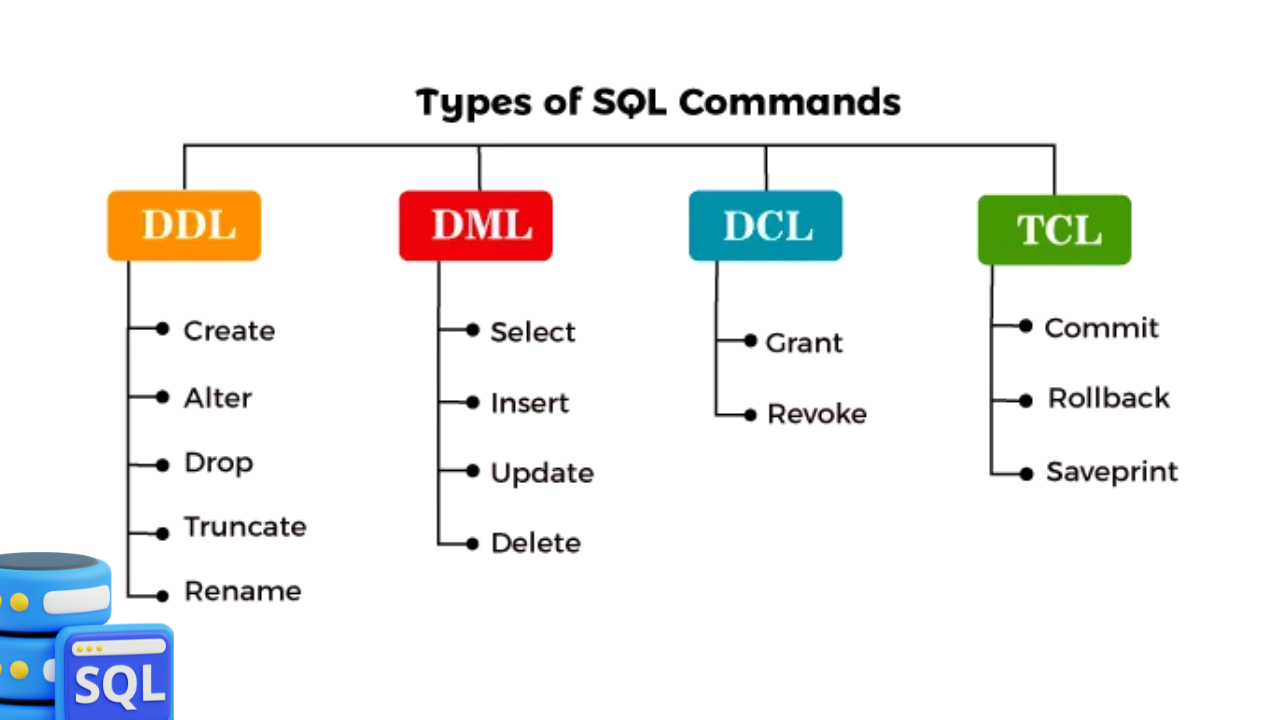
Let's talk about the history of storing data, it all started with physical files and shelves. Later, companies started using Excel or Access. These tools have limitations when it comes to handling high data volumes.
Then, companies started developing database management systems like SQL, PostgreSQL, and MySQL.
Databases are of two types: SQL(Relational, Analytical OLAP) and NoSQL(key value, Graph, Document) mainly used for unstructured dataset. This NoSQL provides more flexibility over Relational as it doesn't have to follow schemas.
Schema is named collection of tables, which can contain views, indexes, data types, operators and functions.
| # | Keyword/Concept | Description |
|---|---|---|
| 1 | SELECT | Retrieves data from one or more tables in a database. |
| 2 | FROM | Specifies the table or tables to retrieve data from. |
| 3 | WHERE | Filters rows based on specific conditions. |
| 4 | JOIN | Combines rows from two or more tables based on a related column. |
| 5 | GROUP BY | Groups rows that have the same values into summary rows. |
| 6 | ORDER BY | Sorts the result-set by one or more columns. |
| 7 | HAVING | Filters data after grouping using GROUP BY. |
| 8 | INSERT | Adds new records to a table. |
| 9 | UPDATE | Modifies existing records in a table. |
| 10 | DELETE | Removes records from a table. |
| 11 | CREATE | Creates a new database object (table, view, etc.). |
| 12 | ALTER | Modifies an existing database object. |
| 13 | DROP | Deletes a database object. |
| 14 | Aggregation Functions (MIN, MAX, AVG, COUNT) | Performs calculations on a set of values and returns a single value. |
| 15 | Joins (INNER, LEFT, FULL) | Retrieves data from multiple tables with matching or non-matching values. |
| 16 | CASE Statement | Adds conditional logic within SQL queries. |
| 17 | Window Functions (RANK, DENSE_RANK, ROW_NUMBER) | Performs calculations across a set of table rows related to the current row. |
- Structure and Content: In SQL, the structure refers to how data is organized in tables, and the content refers to the actual data stored within those tables.
| Category | Alias | Description |
|---|---|---|
| Tuple | Row | Record |
| Attribute | Col | Field |
For example, the following SQL code creates a table named students
- Basic SQL
- Output
- DDL
- DML
- DCL
- TCL
-- Create a table
 CREATE TABLE Students (
 ID INT,
 Name VARCHAR(50),
 Age INT
 );

-- Insert a record
 INSERT INTO Students VALUES (1, 'Alice', 22);

-- Query the table
 SELECT * FROM Students;

-- Update a record
 UPDATE Students SET Age = 23 WHERE ID = 1;

-- Delete a record
 DELETE FROM Students WHERE ID = 1;
-- After creating the table and inserting a record:
ID   Name    Age
1    Alice   22

-- After updating the record:
ID   Name    Age
1    Alice   23

-- After deleting the record:
(No rows returned)
-- CREATE TABLE statement to create a new table with columns and data types
CREATE TABLE customers (
id INT PRIMARY KEY,
name VARCHAR(50),
email VARCHAR(50));

-- ALTER TABLE statement to add a new column to an existing table
ALTER TABLE customers ADD COLUMN phone VARCHAR(20);

-- DROP TABLE statement to remove a table from the database
DROP TABLE customers;
-- INSERT statement to add new data to a table
INSERT INTO customers (name, email) VALUES ('John Doe', 'johndoe@email.com');

-- UPDATE statement to modify existing data in a table
UPDATE customers SET email = 'new@email.com' WHERE name = 'John Doe';

-- DELETE statement to remove data from a table
DELETE FROM customers WHERE name = 'John Doe';
-- CREATE USER statement to create a new user account with specific permissions

CREATE USER 'new_user' IDENTIFIED BY 'password';
GRANT SELECT, INSERT, UPDATE ON customers TO new_user;
-- BEGIN TRANSACTION statement to start a new transaction
BEGIN TRANSACTION;

-- COMMIT statement to save changes made during a transaction
COMMIT;

-- ROLLBACK statement to undo changes made during a transaction
ROLLBACK;
- Advantages: Platform Independent? yes and no — it depends. The core SQL language (based on ANSI/ISO standards) is platform-independent, meaning the basic syntax and concepts—like SELECT, INSERT, UPDATE, and DELETE are the same across different database systems. ❌ But, SQL Implementations Are Not Fully Platform Independent:
Different Database Management Systems (DBMS)—like MySQL, PostgreSQL, Oracle, SQL Server, and SQLite—extend SQL differently. They may:
- Use different data types (VARCHAR vs TEXT, etc.)
- Have custom functions and features
- Handle stored procedures, triggers, and syntax differently
- Offer different tools and performance optimizations
- So, SQL code written for one system may not work exactly the same on another without adjustments.
🗃️ Why Learn SQL?
SQL (Structured Query Language) is the standard language used to manage and query relational databases — the most common way data is stored across businesses. Whether it's MySQL, PostgreSQL, SQL Server, or SQLite — they all speak SQL! 💬
Data engineering is the process of collecting, transforming, and storing data in a way that allows for easy analysis and access. SQL is a critical tool in this process because it allows data engineers to:
- ✅Retrieve data: SQL enables data engineers to retrieve specific data from a database by querying it based on certain criteria. This helps to ensure that data is accessible and easy to find.
- ✅Manipulate data: SQL also enables data engineers to manipulate data within a database by adding, deleting, or updating data. This helps to ensure that data is accurate and up-to-date.
- ✅Manage data: SQL enables data engineers to manage databases by creating tables, defining relationships between tables, and setting up security permissions. This helps to ensure that data is organized and secure.
📊 SQL: A Must-Have for Data-Driven Roles
SQL is a critical skill for anyone working with data. It empowers you to extract, analyze, and transform information efficiently.
Here are some roles where SQL is a game-changer:
👨💻 Data Analysts
🛠️ Data Engineers
🔬 Data Scientists
📈 Business Intelligence Professionals
💻 Software Developers
📣 Marketers
📦 Product Managers
📊 Business Analysts
From running ad-hoc queries to building pipelines and dashboards — SQL is everywhere in data work! 🚀
Getting started with SQL
1. Set up your development environment: Go to MySQL Downloads Page:
- Visit MySQL Workbench Downloads.
2. Download the Installer:: To write your first SQL commands, follow these steps:
- Select the version compatible with your operating system (Windows, macOS, or Linux).
- Click Download and follow the installation instructions.
- https://dev.mysql.com/downloads/workbench/
Conclusion
Learning SQL empowers you to talk to data, unlock insights and build data-driven solutions—making it one of the most valuable and versatile skills in the digital world.